Monday, May 17, 2010

BindingBase class In SilverLight 4.0

In Silverlight 3.0 we use Converts for custom Binding format. To do we Implement the following Interface and its Two Methods.

image

Now In Silverlight 4.0 we have BindingBase class  can relieve us from writing a converter in some situation .

Here we are going to see the following three properties of BindingBase class .   TargetNullValue,StringFormat, and FallbackValue.

TargetNullValue

Here I have Contacts Class with some properties.  one of the property is Age is nullable type. suppose if Age is null we are going to display Text AgeNotknown. using TargetNullValue.

image

image
image


StringFormat:

Here we are going to format the Data of birth property.

image

image

FallbackValue

For example let say we have two classes Contacts and MyClassMate

image

There is a situation when an interface would bind to either an instance of Contacts or MyClassMate . The Year property is available only on MyClassMate . If we are binding an Contacts instance, no value would be displayed for this property. The FallbackValue can be used in this case to indicate that if the property is not found.

Here is XAML code to set FallbackValue.


image

image

Nandri(Thanks)

SreenivasaRagavan

Saturday, May 15, 2010

DataPager-Silverlight Control


Paging is the Job of the DataPager control. This control add paging support to List Box and Data Grid. Here I am going to show different Display Modes of the DataPager control.

First let me list of the available DisplayModes.

image

image

1) FirstLastNumeric

      image

image

2) FirstLastPerviousNext

image

3)   FirstLastPreviousNextNumeric

image

4)   Numeric

image


5) PreviousNext

image

6) PreviousNextNumeric

image

Nandri(Thanks)

SreenivasaRagavan.

Monday, May 3, 2010

LINQ – Let Keyword

In this blog I am going to show how to use Let keyword. The let keyword gives an options to create local variable or sub query from expression. Once the values is assigned you can not create or assigned another value.

Here is an example

image
image

   Nandri(Thanks)

SreenivasaRagavan

Wednesday, April 28, 2010

SilverLight 4.0 –Overriding Anonymous Style.


In my pervious Blog post I showed how define Anonymous style for the Button control. what if we wanted to override that one. Here is how we need to do to override the default style. 

We need to set the Style attribute using this code  Style=”{x:Null}” ( Please see the button Good One)

image
image

Nandri(Thanks)

SreenivasaRagavan.

SilverLight 4.0 – Default Style


In Silverlight 4 Now we have option to set Default style to particular type of control . for example let say I have 4 button controls in my Silverlight UI. I wanted to define Style for the following properties  Margin, Width and height. here is how we usually define Style in Silverlight 3.0.

image

but in Silverlight 4.0 we no need to specify Name. Just remove the Name attribute from Style as shown below.

image

by removing the Name Attribute we are defining Anonymous  style this Style applies to all the button on our application this makes our XAML Code looks tidy and nice

imageimage

Nandri(Thanks)

SreenivasaRagavan

Thursday, April 22, 2010

SilverLight 4.0 Training Material


The Silverlight 4 Training Course includes a whitepaper explaining all of the new Silverlight 4 features, several hands-on-labs that explain the features, and a 8 unit course for building business applications with Silverlight 4. please click to download from the following URL.

image

http://www.microsoft.com/downloads/details.aspx?FamilyID=24CEA29E-042E-41C9-AA16-684A0CA5F5DB&displaylang=en

Nandri(Thanks)

SreenivasaRagavan

Thursday, April 15, 2010

WCF 4.0 Routing Service –Content Based Routing (CBR).

What is Content Based Routing?

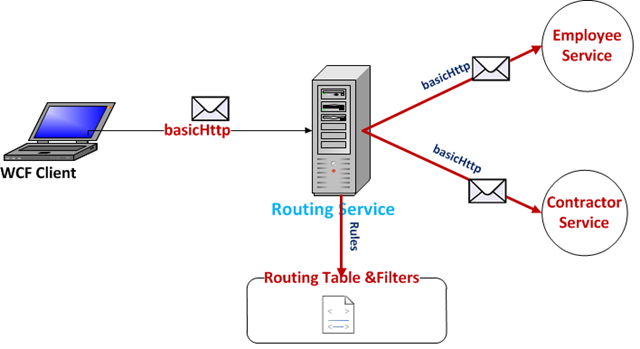
Content-Based Routing seeks to route messages. Messages are routed  not by a specified destination, but by the actual content of the message itself. In a typical application, a message is routed by being opened and then having a set of rules applied to its content.
In this blog post I am going to show how to configure WCF 4.0 Routing Service as Content based router. Here I am going to take an example scenario is Worker Timesheet submission. The timesheets are submitted to one of two services, once service is responsible for processing employees only timesheets and other service will process Contractors Timesheet. The reason two different services are required is that  employee timesheets are automatically processed and approved but contractors timesheets require human interaction to validate the timesheets before their approval.
image
Another thing is that  we do not want the client to know that there are two separate services to handle this timesheets and further to this we do not want them to be responsible for picking which service to call and send the timesheet to.

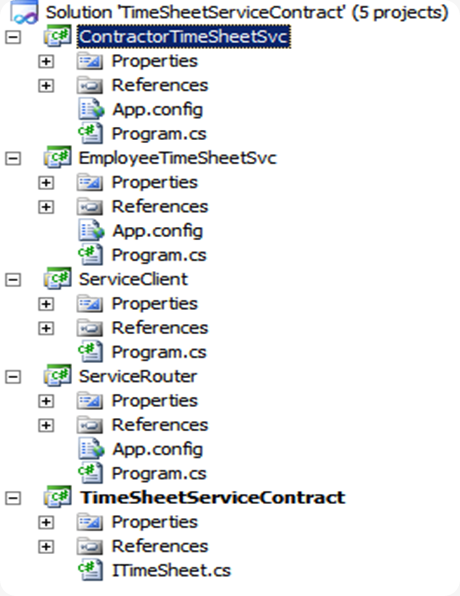
Here is my VS.NET  project structure to implement this above scenario in WCF 4.0 using Routing Service.
image

now let’s create each service component.

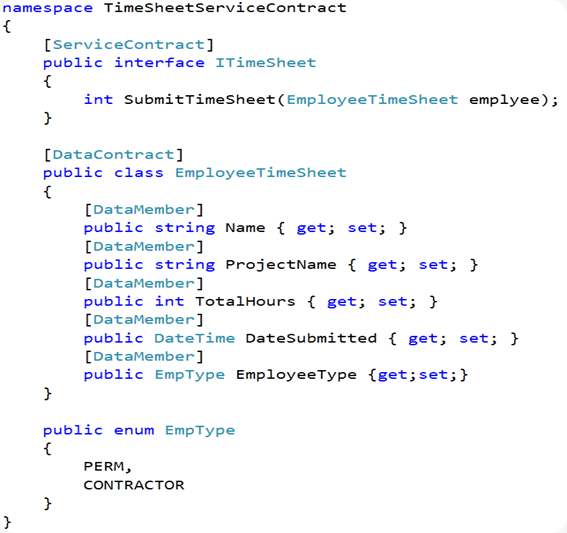
Timesheet Service contract definition
 image

Now we need to implement the above contract in two different services  EmployeeTimeSheetSvc and ContractorTimeSheetSvc. for the demo purpose we simply write out the Timesheet details to the console window.

EmployeeTimeSheetSvc [Hosting]

 image

      EmployeeTimeSheet service listening at the following http://localhost:8000/EmployeeService" endpoint with basicHttpBinding. here we are hosting EmployeeTimeSheetSvc    service in Windows console application [ for real world we should be hosting it in IIS /WAS]

image

ContractorTimeSheetSvc [Hosting]

      image

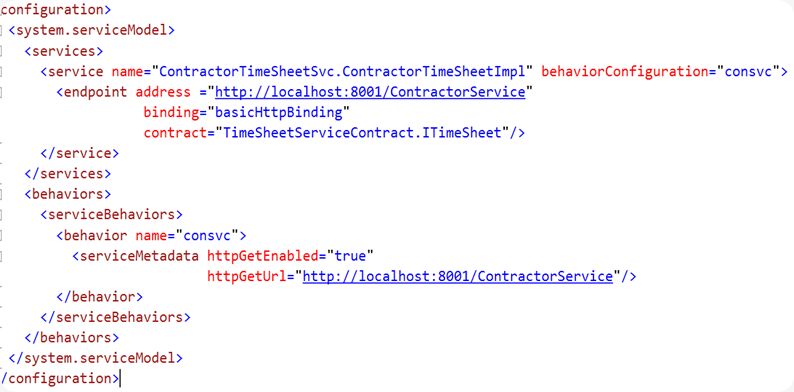
  ContractTimeSheet service listening  at the following http://localhost:8001/ContractorService" endpoint with basicHttpBinding.

image


Router Service [Hosting]

First we need to add the following two .NET Assembly to the Routing Service project.

image

     Here we are hosting RoutingService class.

image

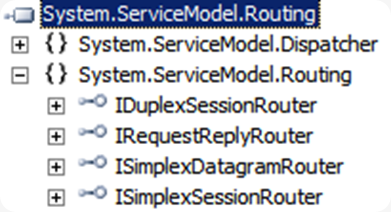
       Here the  RoutingService implements the System.ServiceModel.Routing.IRequestReplyRouter contract. There are other contracts that you could use  based your service requirements .
image

image


If you look at the above configuration the  routing section specifies two filters which uses  XPath to perform the routing. These filters are used in the filterable section which specifies that when the filter’s condition are matched which endpoint should be called. In this  example  we are checking if the  employee type is PERM then  the “empEP” endpoint is called and if the employee type is CONTRACTOR then  “conEP” endpoint is called.

WCF Client Application

Here we are  invoking Timesheet service using ChannelFactory class. This allows us to call WCF service without adding a Service reference[using VE.NET IDE] . but we need to Reference the  Service Contract interface though [ We can  simply copy the service contract Interface definition  to this project.]

image

image

So using WCF 4.0 Routing service it is very easy to configure Router service to forward a message on to another WCF service based on the content of the received message.

Nandri(Thanks)

SreenivasaRagavan

Wednesday, April 14, 2010

WCF 4.0 Routing Service –Failover

In this blog post I am going to show how to configure  WCF 4.0 Routing Service Failover option. I wanted to make sure not to confuse Failover Vs Load balancing.  Service Failover means when client can not reach or communicate with the Service the fall back route is called Failover. for example let say we have  hosted a WCF order Service as main Service, when client wanted to place an order it calls  PlaceOrder Operation  service once service receives the message it will process it.

suppose let say when client calls Operation (Method) on order service at that time if service not available in this case the PlaceOrder Operation message dropped between server and client instead of losing a message we will persist in MSMQ once service comes online we can push these order again to the service to process.

In Windows environment Microsoft Messaging Queue (MSMQ) Service mainly used for to build fault tolerance applications. MSMQ provides Public (as a Active Directory ) and Private Queues to persist the messages when client fails to communicate with service. Here we are going to use MSMQ Private Queue as a our backup service.

image

Now we need to create and host the following Service components.

  1. Define Service Contract and Implementation.
  2. WCF Order Service (Main service)
  3. Backup or Fail over Service
  4. Routing Service
  5. Client App

1) Service & Operation Contracts Definition:


image 

2) Order Service Hosting (Main Service)

image

Configuration

image

3) Backup or Failover Service Hosting

image[44]


image

4) Routing Service Hosting

image

image


Client Application

Create Windows console application and add Service Reference ( Order Service) .

image

     Now we need to modify the Endpoints which points to Router service instead of pointing to WCF Order Service.

Before Modification

image

    After Modification

image

image

        when main service is not running then Router service will send message to MSMQ .

 
image


Nandri(Thanks)

SreenivasaRagavan