Saturday, February 19, 2011

Parallel Programming .NET Framework 4.0 PART-II

In my last Blog  post http://mstecharchitect.blogspot.com/2011/02/parallel-programming-in-net-40.html I introduced the Task Class. Now we are going to see how we can get Computed values from asynchronously executed Task using Task<T>.

Here is the  Example returning values from Task.

image

Here the above task body delegate returns a value that is exposed via the Result property on the task. When you access the Result property, you will get the result immediately if the task has already completed, or otherwise the call will block until the computation completes.

Next we are going execute two Tasks and wait for them to complete and print their Results .

image

Nandri(Thanks)

Sreenivasaragvan

Parallel Programming in .NET 4.0

What is PFX?

PFX- Parallel programming Framework in .NET 4.0 Microsoft Introduced new Library called TPL Tasks Parallel Library. Parallel programming is boarder concept of multithreading. Parallel programming means leveraging multicore or multiprocessor.

image

Why we need to do Parallelism to our code ?

In Recent days we can see that computer CPU speeds are stagnated and adding more cores. so our current programming code wont utilize the all Cores. To speed up and utilize al Cores we need to add Parallel programming code. Even we can use basic System.Threading Namespace to do all Multithreading but its harder to do Data partitioning and collating and thread safety. But it easy to do with Microsoft new TPL library which comes with .NET Framework 4.0

One of the  main feature in .NET Framework is TPL framework Libraries.  TPL – Task Parallel Library . This Library make it easier for developers to write Parallel programs that can run on multi-core Machines. In this blog post I am going to show you how to write Parallel /Asynchronous  programming.

First  let us look at the  TASK Class  this class lives in System.Threading.Tasks

image

Here is simple programs using Task class.

TASK:

image

image

ContinueWith:

Suppose we want to execute some task one after another , I mean continues task we can use  ContinueWith  method 

image

Here is my extension method to print IEnumerable<T>

image


Nandri(Thanks)

SreenivasaRagavan.

Sunday, February 13, 2011

Oracle Released ODAC [Oracle Data Access Components]

I think personally this is great news for me.   Now we use use Oracle DB to created LINQ and EF  Entity's.   here is the beta version of ODAC you can download and test it.

http://www.oracle.com/technetwork/topics/dotnet/downloads/oracleefbeta-302521.html


image

Nandri(Thanks)

Sreenivasaragavan

Saturday, February 12, 2011

IE 9 Release Candidate RC- Really Cool


Download the Internet Explorer 9 Release Candidate to see what’s new

http://msdn.microsoft.com/en-us/ie/default.aspx?WT.mc_id=MSCOM_HP_US_F_113LSUS004275

Internet Explorer 9 RC Now Available
Download the Internet Explorer 9 Release Candidate to see what’s new

image

image

Nandri(Thanks)

SreenivasaRagavan

Thursday, February 10, 2011

Custom Configuration Section in .NET Apps

In this Blog post I am going to write how to define Custom Configuration section in .NET Apps either App.Config or Web.config  and how to use it our programs

Here are the Steps we need to perform

1)  First Create the class which is derived from ConfigurationSection this class resides inside System.Configuration Namespace.

2) Next we need Define Our custom configuration section in our App.config or Web.Config file.  for example here is my custom configuration looks like .

image

3) Next we need to create two more classes which Reads our configuration Key and Key collection

    Here Key are Name and Value

image

image


Next we need to Read Key collection so here is how the class for that

image

Here we are creating Indexer to store key collection as object.


Here is how we use it our program

image


image


Nandri(thanks)

SreenivasaRagavan

Saturday, January 1, 2011

Friday, December 17, 2010

Rx.NET

Rx- Is the new Library in .NET Framework to compose asynchronous and event based programs into Observable Collections. Rx also called Reactive Extensions. Rx Library comes in 3 flavors one for .NET 4.0, Silverlight and JavaScript. you can download and installed from the following link

http://msdn.microsoft.com/en-us/devlabs/ee794896

Pull Vs Push [ Interactive vs Reactive]

IEnumerable and IEnumerator   Pull-Based Collection

IObservable<T> and IObserver<T>. Push Based Collections

image

Duality

image

image

Next Blog Post we will see some sample programs using RX Framework.

Nandri(Thanks)

SreenivasaRagavan.

Tuesday, December 7, 2010

Using IXmlSerializable Interface to serialize Private Members or properties

Suppose let say we have a UDT(User Defined Type) object called person which has the following property's Name,Phone and SSN. Here SSN is read-only properties. When you serializing this person object you get the following error.because XmlSerializer wont serialize the Private members.

image 

To serialize the person object we can implement the  IXmlSerializable Interface as shown below..

image 

Now if you try serialize it will be serialized as XML with out error.

image

Here is the result

image

Nandri(Thanks)

Sreenivasaragavan

Sunday, December 5, 2010

Silverlight 5.0 mainly for LOB Apps and Rich media solutions

The Silverlight 5 beta will be available sometime in 2011 H1, and more information will be available at http://www.microsoft.com/silverlight/

Silverlight 5 introduces more than 40 new features, including support for running Silverlight applications with desktop features in the browser, dramatic video quality and performance improvements, and features that improve developer productivity.

Microsoft_Silverlight

Nandri(Thanks)

Sreenivasaragavan.

Saturday, December 4, 2010

Using ASP.NET Routing Instead of .svc file When Hosting WCF RESTful Service in IIS


ASP.NET Routing are generally used because they give you more control over your URI’s . Now let see how we can use this Routing to host WCF RESTful Service.

1) Create a WCF Service Application

2) Delete the .svc file

3) Now add  the following <serviceHostingEnvironment  aspNetCompatibilityEnabled="true" />to web.config file.

Next you need to  decorate the your class as shown below.

image

Now add Global.asax file to your Service Project and define the One Private method called RegisterRoutes.

image

Now call this method in Application_Start.

image

Now you can browse the service  as  http://localhost:5018/SreeniRestSvc

Nandri(Thanks)

Sreenivasaragavan.

Sunday, October 24, 2010

Using AppFabric (Velocity) Caching API in WCF Service.

One of the best way to improve Application performance is to Cache Data which is frequently Accessed or Retrieved from Database so that we can  reduce the trip to Database and we can minimize or avoid the DB operations. MS Velocity offers in-memory caching.  In this blog I am going to show how to cache the some of the frequently access the data .

In this Exercise I am going to use  MS Free Database Chinook (Album ) as my data model. This Database has bunch of tables but I wanted to cache Customer and Album Tables. Here I am going to create WCF Service which expose to operations which returns list of  All Albums and All Customers.  Before creating WCF service I wanted to give brief introduction on  the Caching API’s we are going to use. Here I am going to use the following two Caching Services APIs

image

To Add Reference to our WCF project we need select it from  GAC ( Global Assembly Cache ). we can not add reference like other Assembly .  GAC is nothing but a  windows  file Folder which is created when you install .NET Framework and its  located  @ C:\Windows\Assembly  to add reference

image 

Here is the Caching API’s Classes and Methods which we will be using in our code.

image 

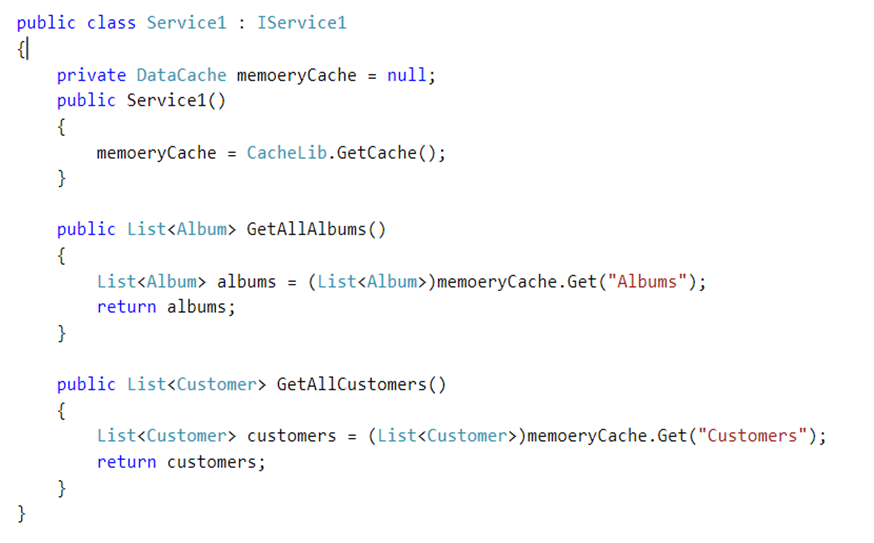
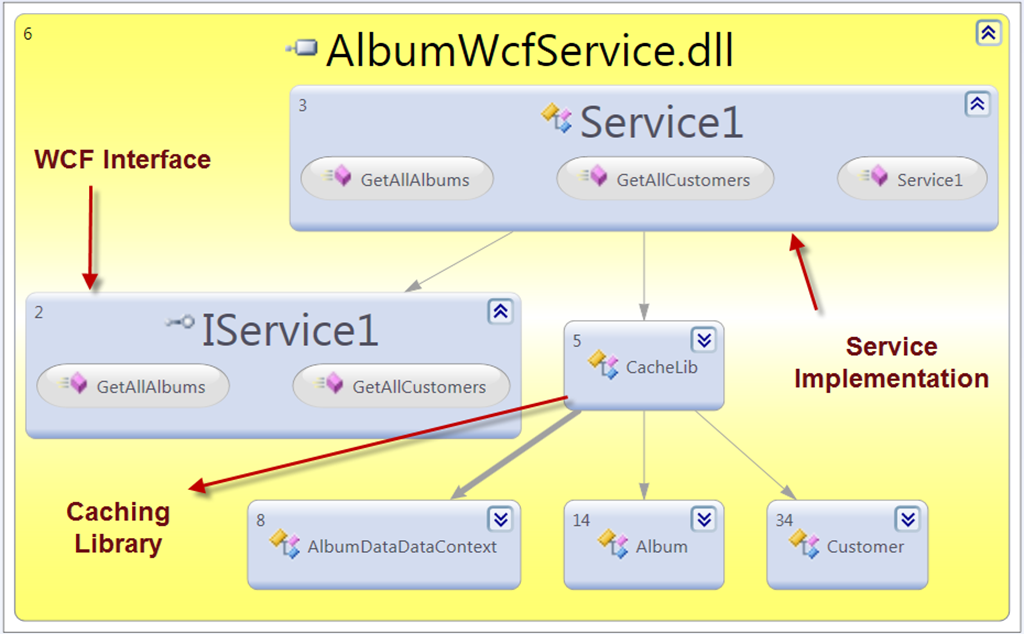
Here I am going to define the WCF Service which exposes two operations  GetAllAlbums and GetAllCustomers 
image

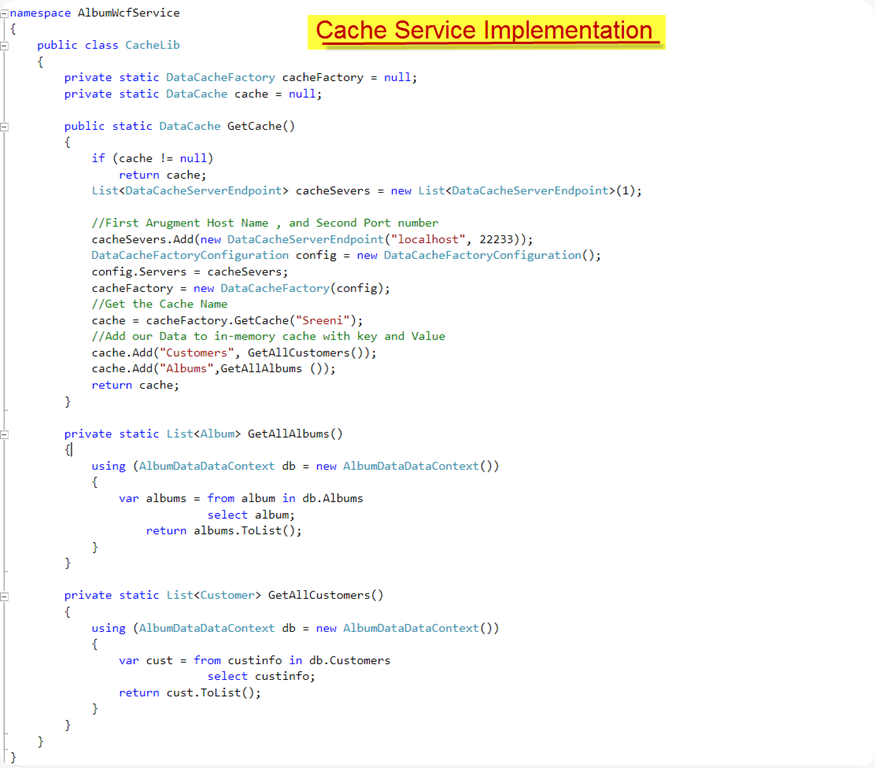
Here is the Caching Library implementation
image


image

using PowerShell Cmdlet we can verify our cache services  first let is check our Cache Host using  “Get-CacheHost”

image 

Get-Cache will displays the Cache Names

image

Get-CacheStatistics will give you the details about Cached item and Request Count etc..

image

Next Blog post we will see how to set Caching services in Web.config

Nandri( Thanks)

SreenivasaRagavan.

Saturday, October 23, 2010

Windows Server AppFabric–Caching Service

Windows AppFabric is set of technologies which offer to Hosting Services and Caching Services. In this blog post I am going show how to Install and Use  Caching Services. Windows AppFabric offers in memory caching with Distributed and Multi cluster supports . Windows AppFabric  aka “Velocity”.

There is two way you can install Windows AppFabric

1) Using Microsoft Web installer[http://www.microsoft.com/web/gallery/install.aspx?appsxml=http://www.microsoft.com/web/webpi/2.0/EnterpriseProductList.xml&appid=AppFabric]

2) You can download the bits from the following URL and Install http://www.microsoft.com/downloads/en/details.aspx?displaylang=en&FamilyID=467e5aa5-c25b-4c80-a6d2-9f8fb0f337d2

Once you download and Run the Installer when you get to this screen where you will be configuring  Caching Service.

image

After installing you will the following Features added to IIS Manager

image

First we need to set Caching Service Configuration provider here you have two options one is  XML provider another options is  SQL Server .  This is just to store Caching Services Details like how many machines (Servers) in the cluster and their port numbers as shown below.  I like to mention here one thing  Windows AppFabric services wont store any Cache data in Database.

image

Here I choose XML is my Service Configuration provider so the configuration file stored in Network file share . Once you successfully installed. we can verify the Installation of Caching Services.   First Launch the  Power Shell Admin tool for Cache Services. 

Now Type “Get-Cachehost” this command will tells the service Status .

image

Here I have created two CacheName  Ragavan & Sreeni

image

image

To got Help for  all Cmdlet you can type Get-Help *

image

Next Blog post  we are going to use Caching API to store and retrieve data from Cache .

Thanks (Nandri)

Sreenivasa Ragavan

Sunday, October 3, 2010

MSDN Magazines

I Like to read MSDN Monthly Magazine and having a digital copy  in locally makes me great.  If you feel the same way I do  please point your browser to the following URL and Download  New and Old Magazines 

http://msdn.microsoft.com/en-us/magazine/ee412244.aspx

image

Nandri(Thanks)

SreenivasaRagavan